Adobe Firefly Plans and Commercial Image Use
Compare Firefly credits and standard generations, then check beta labels, input rights, and third-party claims before commercial use.
- Category
- Comparison
- Official sources
- 4
- Read time
- 7 min
- Last checked
- 2026.09.22
Current Firefly plans and generative credits
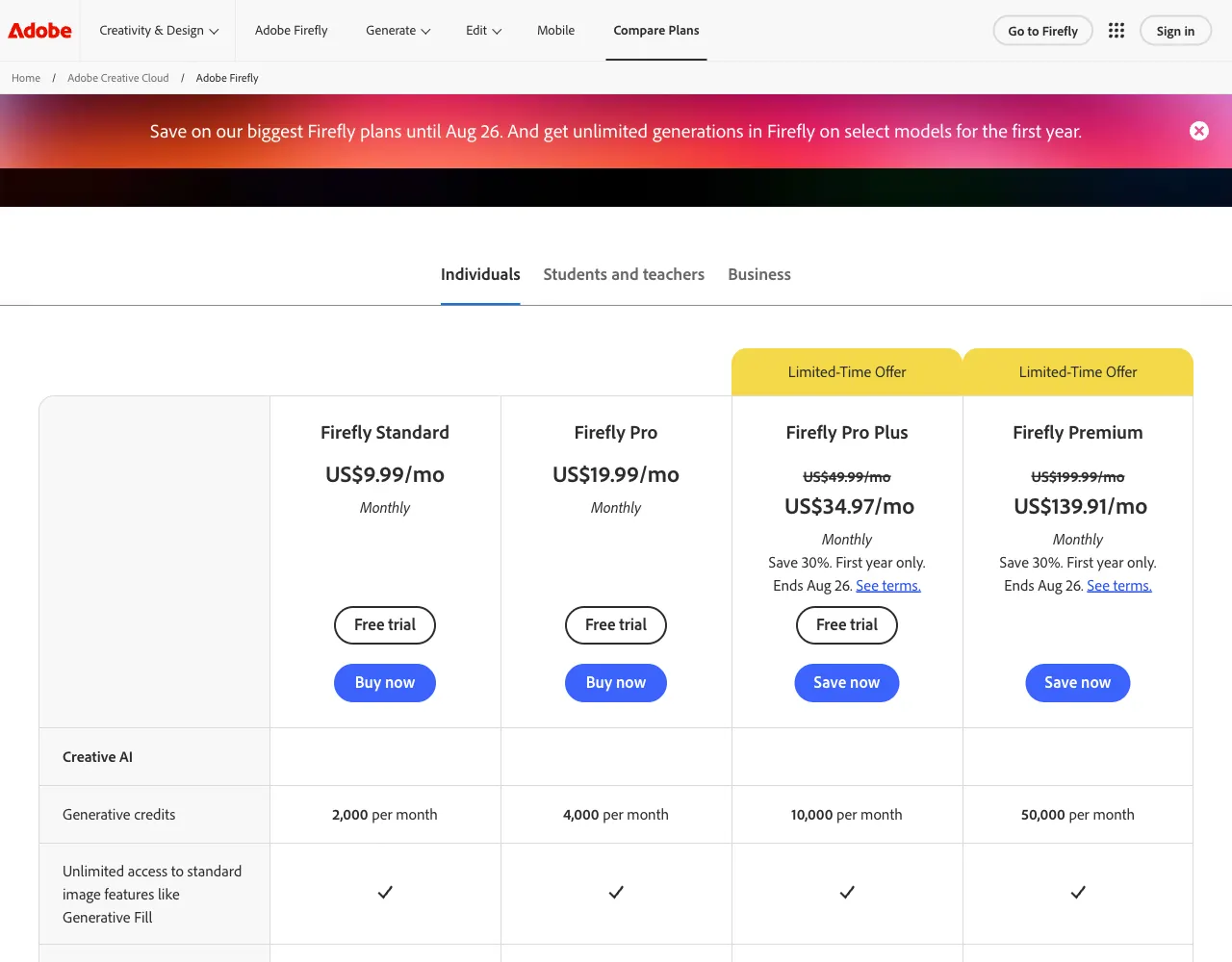
Adobe's September 2026 generative-credit FAQ describes Firefly Free as providing limited daily generations rather than a fixed public monthly credit count. Firefly Standard includes 2,000 credits per month, Pro includes 4,000, Pro Plus includes 10,000, and Premium includes 50,000.
Paid Firefly plans provide unlimited standard image generations; credits are mainly consumed by premium, compute-intensive features such as video and audio. Because currency, tax, and regional offers vary, the checkout shown for the purchasing account is the final price source.
| Plan | Included generative credits | Standard image generation | Best fit |
|---|---|---|---|
| Firefly Free | Limited daily generations | Daily limit applies | Trials and a few concepts |
| Firefly Standard | 2,000 per month | Unlimited | Regular image work and light premium use |
| Firefly Pro | 4,000 per month | Unlimited | Individuals combining images with short video work |
| Firefly Pro Plus | 10,000 per month | Unlimited | Creators with heavier premium-feature use |
| Firefly Premium | 50,000 per month | Unlimited | Repeated video and audio production |
Extra generative-credit plans are available when the included balance is insufficient, but the base subscription and add-on may appear as separate charges. Keep Free when limited daily generation is enough for testing. Choose Standard when standard images are frequent but premium work is occasional.
If video generation is frequent, record actual credit consumption before selecting Pro or a higher tier.
Commercial-use scope and rights boundaries
Adobe says outputs from generally available Firefly features may be used commercially.
Outputs from beta features may also be used commercially unless the product explicitly says otherwise, but beta services can change or end and may fall outside some contractual intellectual-property indemnification. Creating an asset with Firefly therefore does not remove every legal risk.
You must hold the necessary rights to uploaded logos, photographs, fonts, and reference images. A result resembling a real person or retaining another party's trademark, character, or protected design may require permission or a separate license. Content Credentials describe provenance; they are not copyright registration or a guarantee of exclusive rights.
Copyright protection for a purely AI-generated result can also vary by jurisdiction, so retain source files and a record of meaningful human selection and editing for important campaigns.
If an Adobe Stock asset is referenced or combined, review its Stock license separately from the Firefly subscription. Enterprise indemnification depends on an eligible plan and the governing contract; a personal subscriber should not assume identical protection.
For client advertising, also review the distribution countries, model releases, trademark clearance, and the destination platform's advertising rules.
Choosing a plan for the actual workload
Stay on Free when you only need a few concepts and its daily limit does not interrupt delivery. If limit messages repeatedly prevent completion, move to Standard after checking the monthly credits and renewal date on the account page.
When standard images dominate and video is occasional, start with unlimited standard generation plus 2,000 credits and decide from the measured depletion rate.
When premium video or audio is used regularly, check whether the latest 30-day consumption exceeds 2,000 credits before choosing Pro or Pro Plus.
If a production team regularly exhausts 10,000 credits, evaluate Premium, but do not share one personal subscription among multiple people; compare seat count, administrative control, and indemnification in the team or enterprise contract.
For a temporary campaign spike, compare an extra-credit plan's renewal and cancellation terms rather than making a long-term tier change. If extra credits are purchased every month, compare the total charge with the next plan's included amount.
When Adobe web checkout and an app-store screen differ, use the final amount and terms for the channel through which the purchase will actually be made.
From account checks to output review
- Sign in to the Adobe account, open the Firefly profile or account-management screen, and confirm the current plan, remaining generative credits, and next reset date.
- Open the Adobe Firefly plans page, compare the included credits for Standard, Pro, Pro Plus, and Premium, then record the currency, tax, and renewal period shown after selecting checkout.
- On the intended feature screen, check for a beta label or commercial-use restriction; if a separate prohibition appears, do not use that feature for an advertisement or item for sale.
- Record the owner and permitted scope of every uploaded logo, portrait, product image, and font; remove anything whose rights cannot be demonstrated or replace it with a licensed alternative.
- After generation, enlarge the result and inspect trademarks, signatures, similarity to real people, and distorted wording, then make necessary human edits and retain the original prompt and editable file.
- Confirm that the account balance fell by the expected amount, export the final asset as PNG or JPEG, and verify resolution and aspect ratio in the advertising platform's preview.
The work record should name the feature, beta status, input source, generation date, human edits, and final use. Completion means the plan name matches between checkout and the account screen, the file opens at the target resolution, and no asset remains unverified in the rights worksheet.
If the recipient requires Content Credentials, inspect whether the exported file retained the relevant metadata.
Resolving credit errors and uncertain licensing
If a paid account reports insufficient credits during standard image generation, confirm that the same Adobe ID is signed in and that the selected feature is not actually premium. If the plan name does not update after payment, sign out and back in, then give Adobe Support the receipt order number and account email.
For an app-store subscription, inspect that store's subscription state as well as Adobe's web billing history.
When commercial use remains uncertain, do not deliver the result immediately. Save the feature's restriction label and the relevant Adobe product terms. Replace an input whose rights cannot be verified with an original photograph, a Stock asset explicitly licensed for the use, or a file backed by the rights holder's written permission.
A high-risk brand campaign should receive final review from the contracting team or qualified counsel.
- Account plan, credit balance, and reset date match the billing record
- The feature shows no commercial prohibition or separate beta restriction
- License evidence is retained for logos, photos, fonts, and Stock assets
- Publicity rights and third-party trademarks or characters were reviewed
- Final PNG/JPEG resolution, aspect ratio, and metadata were verified
If Firefly is unavailable or its contract does not fit the project, create the work directly or select another tool that documents its commercial license and protection. Third-party-rights review remains necessary regardless of the tool.
Revision history · 2026-09-22
This article was revised against the provider’s official documentation. Korean note
Sources
Adobe Help Center — Generative credits FAQ (2026-09-22)
Adobe Help Center — Generative credits overview (2026-09-22)
Adobe Help Center — Adobe Firefly FAQ (2026-09-22)
Adobe Legal — Adobe Firefly product description (2026-09-22)
Open provider document