OpenAI API key safety: environment checks and rotation
Check environment configuration without printing secrets, verify Git exclusions, and distinguish project budget alerts from application-enforced limits.
 OpenAI
- Category
- Developer tools & APIs
- Official sources
- 3
- Read time
- 6 min
- Last checked
- 2026.09.19
Separate the project from the execution environment
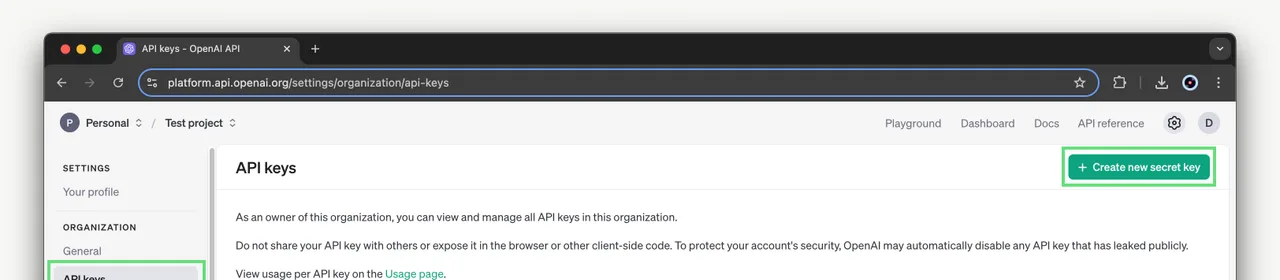
Select the intended project in OpenAI Platform and create a key in its API keys settings. Project members can create keys within their permissions; creation is not universally limited to organization owners. Use a separate deployment credential instead of sharing a developer's personal key.
Store local secrets in an ignored environment file and production secrets in the hosting platform's secret store. Never embed a secret key in browser or mobile application code. A variable exported into a public frontend bundle is still public, even if it is called an environment variable.
| Where it runs | Where the key lives | What to avoid |
|---|---|---|
| Local Python or Node server | An environment file excluded from Git | Typing the key string into source code |
| Deployed server | The hosting service's secret settings | Printing the whole environment to build logs |
| Browser or mobile client | Nothing stored locally; call your own server | Shipping a secret key in a public bundle or app code |
Verify both ignore rules and existing tracking
Use these patterns in the project's .gitignore. Keep actual values out of .env.example.
.env
.env.*
!.env.example
These commands print file names or rules, not key values:
git check-ignore -v .env
git ls-files -- .env
The first should show the applicable ignore rule; the second should be empty. If the second prints .env, the file is already tracked. git rm --cached -- .env stops tracking while keeping the working file, but does not remove secrets from earlier commits. Assess exposure and rotate the credential when needed.
Check configuration without exposing the value
Run this Python standard-library example after your shell or process launcher has supplied the variable. Creating an .env file alone does not make Python load it.
import os

key = os.environ.get("OPENAI_API_KEY", "").strip()
if not key:
    raise SystemExit("OPENAI_API_KEY is missing")
print("OPENAI_API_KEY is configured; value hidden")
The expected success message is OPENAI_API_KEY is configured; value hidden. It confirms only that a nonempty value exists. It does not validate authentication, project permissions, billing or model access. An API connection test is a separate step; model requests can incur charges. Match the variable's spelling and case exactly across the process and code.
| Result | What it means | What to check next |
|---|---|---|
| missing | The running process has no value | The environment file loader, a restart, the variable name |
| configured | A non-empty value is present | Project permissions and a live call to the server |
| Authentication failure | A presence check alone cannot resolve it | A revoked key, a different project, a wrong value |
| Rate limit error | Possibly a call-frequency or quota problem | The error code in the response body, and usage |
A spend limit is either alert-only or a hard limit
A project spend limit can be set two ways according to the official documentation: alert-only, which monitors spend without enforcement, or a hard limit, after which API requests fail once tracked spend reaches it. Do not assume requests stop automatically without checking which one is configured.
Applications needing a strict boundary should check shared request counters, concurrency and spending estimates before issuing work. A 100-job daily limit should reject the 101st job before the API call. A request-count limit is not a dollar limit: input length, output length and additional features can vary.
Revoke exposed keys explicitly
If a key is exposed, revoke it and review usage. Create a replacement, update server secrets and restart or redeploy affected services. Include scheduled jobs in the inventory. Creating the replacement or renaming an environment variable does not revoke the old credential.
Investigate logs, commit history and shared files without treating deletion as a substitute for revocation.
Correction, 2026-09-08: removed unsupported claims about a five-key maximum, automatic revocation during replacement and a guaranteed project-budget cutoff. Replaced secret-printing commands with a presence-only check.
The procedure, and the alternative when it fails
- Select the project on the OpenAI Platform screen and open its API keys settings menu.
- Create the key and save the displayed value straight into the
.envfile. - Enter the exclusion rules in
.gitignoreand confirm them with thegit check-ignore -v .envcommand. - With your shell or launcher injecting the variable, run the example above and confirm it prints
configured. - Send one request to a real endpoint to confirm that authentication passes as well.
If git ls-files -- .env lists the file, adding it to .gitignore is not enough: stop the tracking with git rm --cached -- .env and commit. If the value already reached an earlier commit, treat the key as exposed and revoke it. If the call comes from a browser or a mobile app, keep the key off the client and use your own server.
If missing appears, the value never reached the process, so check the launcher's environment-file setting, whether it was restarted, and the variable name, in that order. If it prints configured but authentication fails, check whether the key was revoked or belongs to a different project.
If a rate limit error appears, it may be about call frequency or quota, so check usage in the dashboard, and where you cannot change the limit on an organization account, ask the administrator to adjust the per-project limit.
Revision history
This article was revised against the provider’s official documentation. Korean note
Sources
OpenAI — API key safety (2026-09-08)
OpenAI — Managing projects in the API platform (2026-09-08)
OpenAI — Production best practices (2026-09-08)
Open provider document