OpenAI API Pricing: Calculate Cost and Check Usage Limits
OpenAI API cost is price per million tokens times usage, billed apart from ChatGPT: current prices, usage tiers, and where to set a budget.
 OpenAI
- Category
- Developer tools & APIs
- Official sources
- 2
- Read time
- 6 min
- Last checked
- 2026.09.24
API charges are per token and separate from a ChatGPT subscription
The OpenAI API is billed separately from monthly ChatGPT Plus or Pro subscriptions.
Even with a ChatGPT subscription, requests sent with an API key are charged per token to the API Platform billing account, and adding funds to the API does not change the ChatGPT app's limits.
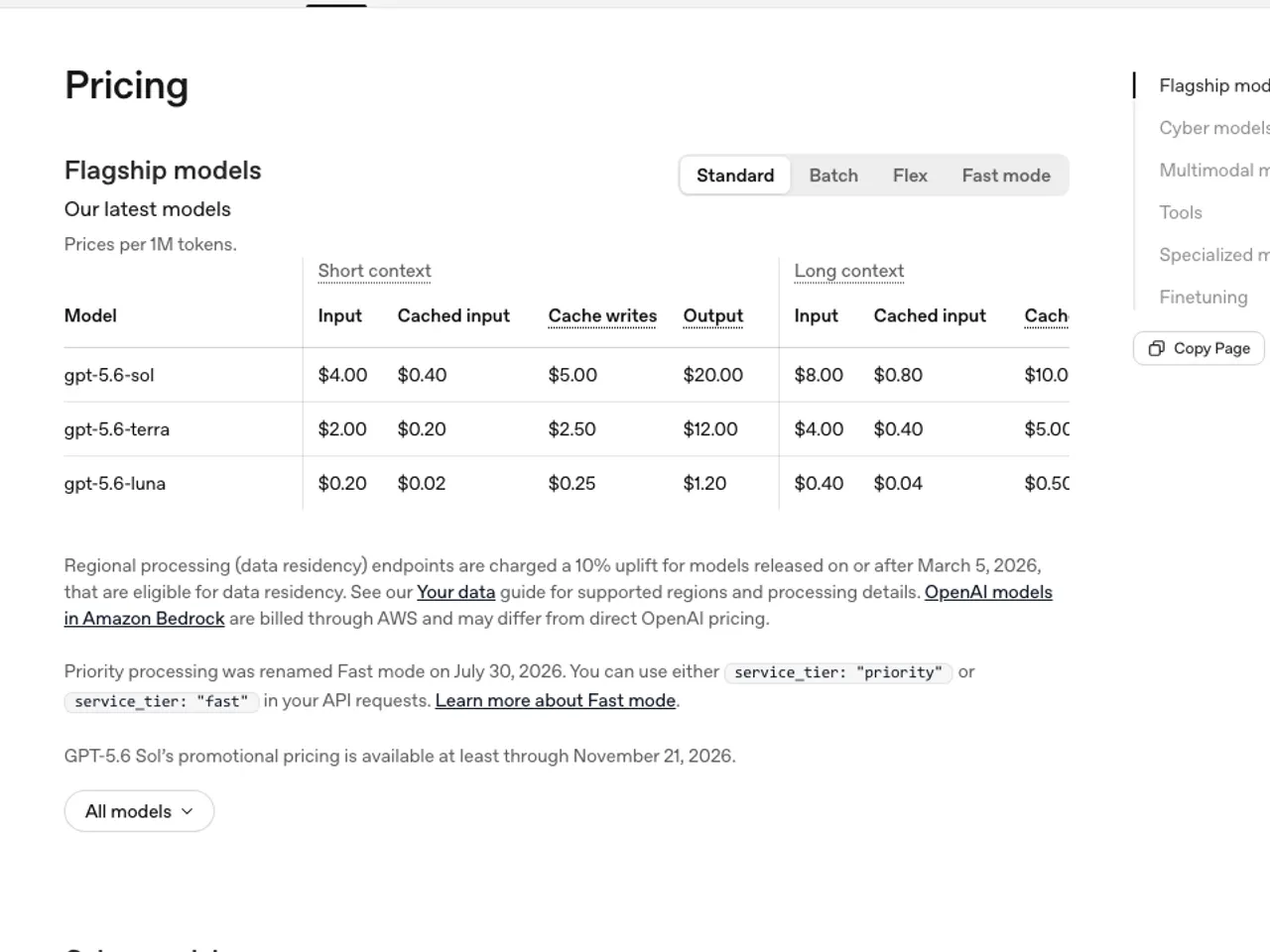
Cost is each model's price per million tokens multiplied by the input and output tokens used; when the beginning of a repeated prompt is cached, the cached-input price applies. [1]
| Model | Input | Cached input | Output |
|---|---|---|---|
| gpt-6-luna | $0.10 | $0.01 | $0.50 |
| gpt-5.4-mini | $0.75 | $0.075 | $4.50 |
| gpt-6-sol | $2.00 | $0.20 | $10.00 |
| gpt-5.6-terra | $2.00 | $0.20 | $12.00 |
| gpt-5.4 | $2.50 | $0.25 | $15.00 |
| gpt-5.6-sol | $4.00 | $0.40 | $20.00 |
| gpt-6-astra | $10.00 | $1.00 | $50.00 |
Source: OpenAI API pricing page, USD per million tokens, standard processing [1]
Output costs around five times input, so jobs with long answers get expensive quickly. Large jobs that are not time-sensitive get about 50% off on most models through the Batch API, while Fast mode (renamed from Priority processing on July 30, 2026) costs 2 to 4 times more.
Models released on or after March 5, 2026 carry a 10% uplift on regional (data residency) endpoints. Prices change often, so re-check the pricing page before fixing a budget. [1]
Usage limits rise automatically with cumulative payments
The API has rate limits such as requests per minute (RPM), requests per day (RPD), tokens per minute (TPM), tokens per day (TPD) and images per minute (IPM), plus a monthly usage limit.
Your organization's current limits are shown on the Limits page in account settings, and as cumulative spend grows you are moved to the next tier automatically, which raises the limits on most models. The tiers and monthly usage limits are as follows. [2]
| Tier | Qualification | Monthly usage limit |
|---|---|---|
| Free | User in an allowed geography | $100 |
| Tier 1 | $5 paid | $100 |
| Tier 2 | $50 paid | $500 |
| Tier 3 | $100 paid | $1,000 |
| Tier 4 | $250 paid | $5,000 |
| Tier 5 | $1,000 paid | $200,000 |
Source: OpenAI API rate limits guide [2]
A new billing account starts at Tier 1, so a burst of requests early on returns HTTP 429. When 429 appears, retry with longer intervals; if it recurs in normal use, wait for the cumulative spend to move you up a tier or spread the load.
An organization that needs a higher monthly limit can request an increase on the Limits page, and approval is not guaranteed. [2]
Checking cost and setting a budget
- Sign in at platform.openai.com, register a payment method under Settings > Billing and add prepaid credit.
- On the same Billing screen, set a monthly budget (usage limit) and an alert threshold. OpenAI can rename these fields, so follow the current labels.
- Under Settings > Limits, check the organization's tier and per-model RPM and TPM limits.
- On the Usage screen, review token usage and cost by model and day, and compare it with your own logs' token totals.
- Issue API keys on the API keys screen, store them only in environment variables and make sure ignore rules keep them out of the repository.
The normal state is HTTP 200 with a JSON body for a short curl request, followed shortly by that request's tokens appearing on the Usage screen. If the two diverge widely, check whether another project or tool is using the same key. [2]
Diagnosing failures
401 means the key is wrong or revoked, so issue a new one. 429 is a rate limit or monthly usage limit; the message in the response body tells the two apart. If requests are refused because the balance is used up, add credit under Billing or turn on auto-recharge.
If the payment method is declined, confirm with the bank that the card allows international payments. In every case, code that immediately repeats a failed request burns through the limit faster, so retry with increasing delays. [2]
When this is not the right choice
If you send only a handful of requests a month and want conversation rather than development, a ChatGPT subscription is simpler than the API; see ChatGPT free limits and plans for plan limits.
At the other end, an organization whose usage exceeds the Tier 5 monthly limit or that needs contracts and invoice billing should discuss an enterprise agreement with OpenAI's sales team. Korean input uses more tokens than English, so scale Korean budgets by the ratio in our Korean token measurement.
[1][2]
Revision history · 2026-09-24
This article was revised against the provider’s official documentation. Korean note
Sources
developers.openai.com — API pricing (2026-09-24)
developers.openai.com — Rate limits (2026-09-24)
Open provider document