ChatGPT vs Gemini vs Claude: Prices and Free Limits
ChatGPT Plus and Google AI Pro cost ₩29,000 a month and Claude Pro $20. Compare official prices, free limits and overage rules before you pay.
 OpenAIGGeminiC
- Category
- Pricing
- Official sources
- 7
- Read time
- 5 min
- Last checked
- 2026.09.19
Verified Pricing and Public Scope
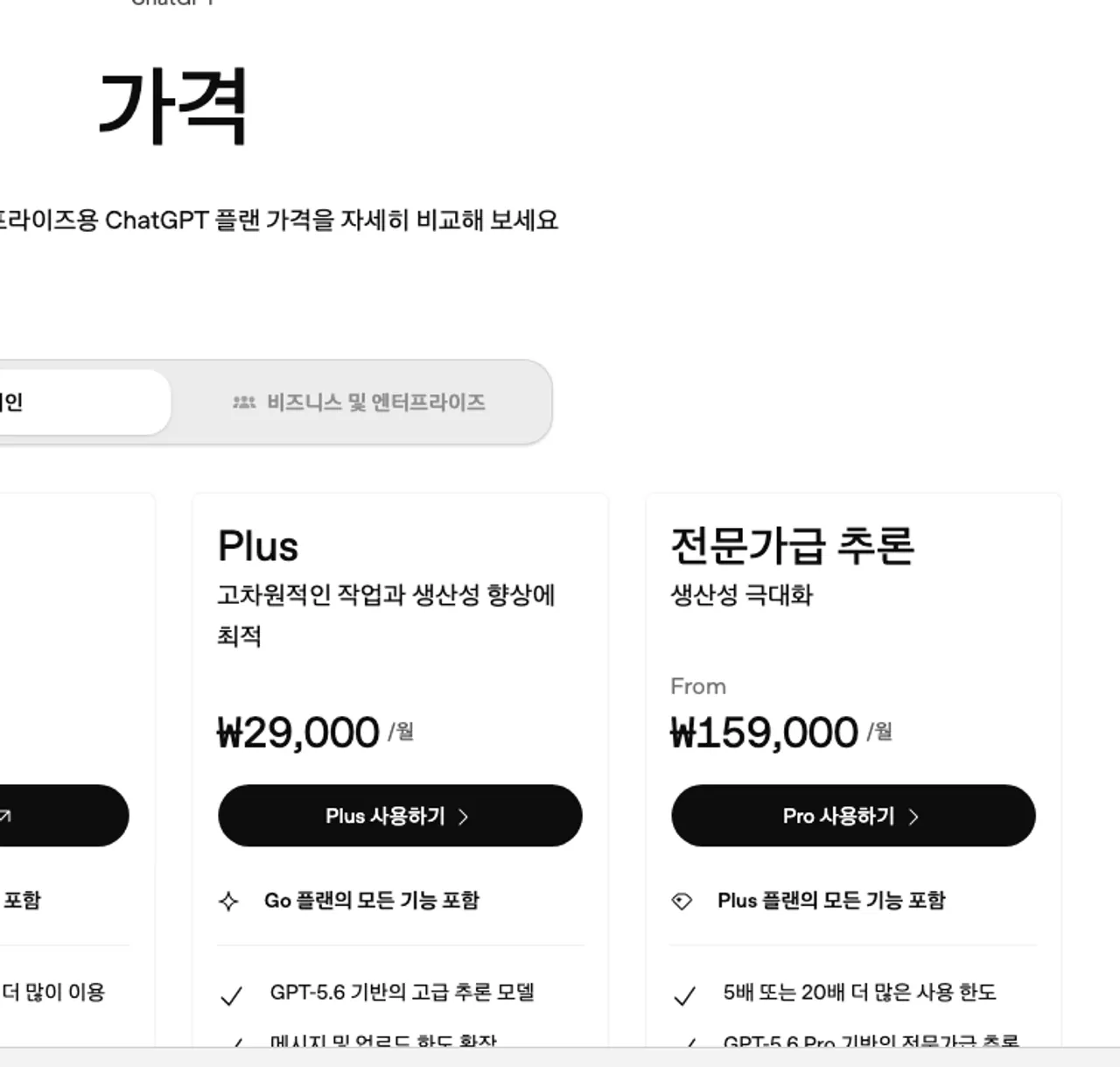
The Korean ChatGPT pricing page, checked on 10 September 2026, lists Free at ₩0, Go at ₩13,000 per month, Plus at ₩29,000 per month, and Pro from ₩159,000 per month. The page notes that the Go plan may include ads.
Business and Enterprise are billed per user per month, with amounts shown after login on the billing screen or through sales.
The Korean Google AI plans page, checked the same day, lists Google AI Plus at ₩7,500 per month (400 GB of storage), Google AI Pro at ₩29,000 per month (5 TB), and Google AI Ultra from ₩119,000 per month (20 TB and up).
A 40% discount on the Google AI Pro annual plan is advertised for eligible users until 31 October 2026, and Google AI Ultra is listed as available in more than 150 countries, so check the account screen for your country.
The Claude pricing page shows Free at $0. Claude Pro is $17 per month on an annual subscription discount basis, with an annual prepaid charge of $200; monthly billing is $20. Claude Max starts at $100 per month; displayed prices may not include applicable taxes, and prices and plans are subject to change at Anthropic's discretion.
| Service | Free | Personal Paid | High Usage | Team/Organization |
|---|---|---|---|---|
| ChatGPT | Free ₩0; limited messages, uploads, image generation, deep research | Go ₩13,000/month (may include ads), Plus ₩29,000/month | Pro from ₩159,000/month, 5x the Plus usage | Business and Enterprise billed per user per month; amount on billing screen or via sales |
| Gemini | Free for non-subscribers with reduced features | Google AI Plus ₩7,500/month (400 GB), Google AI Pro ₩29,000/month (5 TB) | Google AI Ultra from ₩119,000/month (20 TB and up, up to 20x access) | Gemini Enterprise via sales |
| Claude | Free $0 | Pro $20/month, or $17/month billed annually ($200 up front) | Max from $100/month, 5x or 20x Pro usage | Team Standard seat $20/month annual or $25 monthly, Premium seat $100 annual or $125 monthly, Enterprise $20 per seat plus usage |
| Basis | KRW from the Korean pages, USD from the Claude pricing page | Tax may be extra | Checked 10 September 2026 | The final amount on the billing screen prevails |
The "Free" label in the table does not imply unlimited use. ChatGPT Free provides limited messages and uploads; Claude advises that usage limits apply per plan.
Selection Conclusions by Condition
For testing only document summarization or drafting for free, test ChatGPT Free, Google AI non-subscriber environment, and Claude Free each with the same material and record the actual point of restriction.
The message counts and model-specific detailed limits of free plans are not disclosed with identical numbers in collected materials, so compare based on remaining usage displayed on each service screen.
For an individual choosing around ₩30,000 a month, ChatGPT Plus and Google AI Pro both cost ₩29,000 per month, while Claude Pro is $20 per month and varies with the exchange rate. The lowest paid entry points are Google AI Plus at ₩7,500 and ChatGPT Go at ₩13,000, and Go may include ads.
For a personal user who needs more Claude usage and Claude Code at a fixed monthly cost, compare Claude Pro's $20 monthly or $200 annual prepaid payment. The indication of $17 per month on an annual basis is a calculated display from the $200 prepaid method, not an actual monthly billed amount.
For repeated processing of long documents and files, first compare ChatGPT's file limits and project file counts. ChatGPT files are limited to 512 MB per file, 2M tokens per text/document file, 20 MB per image; CSV/spreadsheet limits may be approximately 50 MB.
When multiple users require centralized billing and administrator controls, verify the official sales screens for ChatGPT Business/Enterprise, Google organization conditions, and Claude Team/Enterprise.
Claude Team publishes Standard seats at $20 per month annual or $25 monthly and Premium seats at $100 annual or $125 monthly; ChatGPT Business and Enterprise and Gemini Enterprise are priced on the billing screen or through sales, so do not treat a personal plan price as the organization price.
Diverging Conditions in Billing, Renewal, and Additional Charges
On Claude's pricing page, annual billing is available only for Pro and Team; Max is billed monthly only, and Enterprise is annual only. Users who subscribed via the Claude mobile app can activate Usage credits only on the web and must add a payment method on the web.
Claude's Usage credits are not included in the subscription limit. After reaching the usage limit, activate them in Usage settings; if a balance exists, additional usage charges at standard API rates are billed separately.
Claude usage aggregates across product screens including claude.ai, Claude Code, and Claude Desktop into the same usage limit. Assuming Claude Code is calculated as a separate service would shift the actual limit-reached point.
ChatGPT file storage shares 25 GB for individual users and 100 GB for organizations. This storage applies across conversations, Projects, and custom GPT knowledge, so deleting one file may not free space if other locations retain files.
ChatGPT file uploads are generally limited to 80 files per 3 hours; Free users are limited to 3 per day. Peak times may lower upload limits, and failed upload attempts may count toward the upload rate limit.
How to Compare the Plans and Choose
The following procedure compares free usage and result quality by feeding the same CSV file to each service. Do not upload company confidential information, customer personal data, or non-disclosure agreements before verifying organizational policies and each service's data processing conditions.
- Create a
sales_sample.csvfile with columnsdate,product,region,amountand enter test values only. - In the ChatGPT chat input, enter:
First verify the column names of this CSV, then output a table of region-wise amount sums and row counts. Display the row count used for calculation on the last line. - After ChatGPT completes the file upload, verify the result table containing region names, sum column, and row count.
- On Gemini's official Google AI plan screen, check the current account's access plan and displayed Gemini access level, then input the same CSV and prompt.
- In Claude, upload the same CSV and enter:
Output column names, region-wise amount sums, and calculation target row counts as a Markdown table. - Compare each service's results for presence of
calculation target row count,region-wise sums, andmissing row status. - A person recalculates the original CSV sums in a spreadsheet and reviews amounts, row counts, and currency units as final verification.
- Record the point at which free usage restriction messages appear and the payment screen amounts for the selected plan, then judge paid plans under identical conditions.
Comparison results prioritize match of sums and row counts over model explanatory text. Even if file analysis results are correct, do not use as final business values without human review of source data and formulas.
Causes and Recovery When Limits Are Reached
If ChatGPT displays upload limit reached, verify the account and subscription plan. Next, check storage usage in Settings > Storage and delete remaining files in recent conversations, Projects, and custom GPT knowledge.
ChatGPT shows storage usage in Settings > Storage but does not currently display used and remaining quantities in the rolling upload limit, as advised. Even with storage remaining, the 3-hour upload rate limit may have been reached; check status.openai.com for incidents.
If Claude displays 5-hour limit reached - resets [time], verify the cause of limit exceedance in the same session until the displayed reset time. If 5-hour limit resets [time] - continuing with usage credits appears, Usage credits are active and additional charges apply.
If Claude displays Your message will exceed the length limit for this chat. Try attaching fewer or smaller files or starting a new conversation., reduce attachments or split into smaller files and start a new conversation.
On paid plans with code execution enabled, long conversations may auto-summarize previous content, but this does not guarantee resolution of input length errors.
If errors persist, for ChatGPT provide account email, error screen, occurrence time and timezone, platform/app/browser used, and request ID to official support. For Claude, provide error text, reset time, product screen used, Usage credits activation status, and distinguish payment issues by payment path used.
Post-Change Normal State and Alternatives
Claude paid plan changes proceed by selecting Pro or Max on the pricing page and comparing monthly and annual billing conditions. Usage credits changes are verified by checking Enable status and payment method registration in Settings > Usage > Usage credits.
The ChatGPT and Gemini pricing pages do not show renewal dates, cancellation menus, or refund conditions. Check those on the billing screen after signing in and in each service's official billing help.
When the payment screen displays plan name, billing cycle, tax indication, next billing date, and additional usage charge status, save the change result. On the Claude Usage credits screen, confirm Enable switches to active and that the standard API rate charge phrase appears for additional usage.
If file analysis is the primary task and ChatGPT Free's 3 uploads per day limit or storage limit blocks work, first measure current account limits on Claude or Gemini instead of reducing or splitting files.
When organizational approval, centralized billing, or role-based permissions are required, do not purchase personal plans; proceed with administrator verification via the service's Team/Business/Enterprise sales path.
Plans without a published amount, such as ChatGPT Business and Enterprise and Gemini Enterprise, are verified on the official pricing page's country- and account-specific billing screens and through sales. If the currency and tax inclusion on the payment screen differ from the material's display, record the screen's final billed amount as the basis.
Revision history
This article was revised against the provider’s official documentation. Korean note
Sources
chatgpt.com — ChatGPT 요금제 (2026-09-10)
help.openai.com — ChatGPT file uploads FAQ (2026-08-13)
one.google.com — Google AI plans (2026-09-10)
claude.com — Claude pricing (2026-09-10)
support.claude.com — Claude usage and length limits (2026-08-13)
support.claude.com — Troubleshoot Claude error messages (2026-08-13)
support.claude.com — Manage usage credits (2026-08-13)
Open provider document