ChatGPT Billing Errors, Cancellation and Refunds in Korea
How to tell a duplicate charge from a charge after canceling, where to cancel and request refunds, and the 7-day refund rule for residents of Korea.
 OpenAI
- Category
- Troubleshooting
- Official sources
- 2
- Read time
- 7 min
- Last checked
- 2026.09.24
Refund request channel depends on the initial payment method
The refund request must be submitted through the same channel used for the original payment. Determine whether the subscription was purchased via the web, Apple subscription in the iOS app, or Google Play before proceeding.
For subscriptions paid through Apple, refunds and cancellations must be requested directly with Apple, not OpenAI. Submitting a request via OpenAI’s support will not process the refund, leading to unnecessary delays.
| Payment Method | Request Channel | Processing Time |
|---|---|---|
| Web (chatgpt.com) | help.openai.com chat widget | 5–7 business days after approval |
| Google Play | help.openai.com chat widget | 10 business days after approval |
| Apple subscription | Direct request via Apple | Follows Apple’s policy |
| Account deletion | Subscription auto-cancels | Only future billing stops |
Telling a duplicate charge from a charge after cancellation
If you were charged twice in one month, first check who billed you on each receipt. Subscriptions on chatgpt.com, the Apple App Store and Google Play are managed separately, so canceling one leaves the others renewing, and uninstalling the app does not cancel a subscription.
If you were charged after canceling, check when you canceled. OpenAI says to cancel at least 24 hours before the next billing date to avoid being charged for the next period. Cancel a web subscription under Settings > Billing > Cancel plan, then confirm on the billing platform that renewal is off.
If you cannot sign in to the account email to cancel, send OpenAI Support the account email, the last four digits of the payment card and the latest payment date. Never send the full card number.
Special refund conditions for Korean residents
Korean residents are subject to distinct refund conditions. A full refund is available if the cancellation request is made within 7 days of purchase and the service has not been used during that period. Failure to meet either condition disqualifies the user from a full refund.
If the full refund conditions are not met, prorated refunds apply. The prorated amount is calculated from the cancellation request date to the end of the subscription period. Residents in the EU, UK, and Türkiye have a separate 14-day cancellation window for prorated refunds.
An unintended payment is not by itself grounds for a refund. OpenAI's refund article says an accidental purchase, forgetting to cancel, or a plan change does not qualify on its own, while a verified OpenAI billing error or a validated unauthorized charge may be refunded.
Note that cancellation takes effect immediately upon request. Users cannot continue using the service while awaiting a refund; the subscription ends at the time of cancellation.
Steps to request a refund for a web-purchased subscription
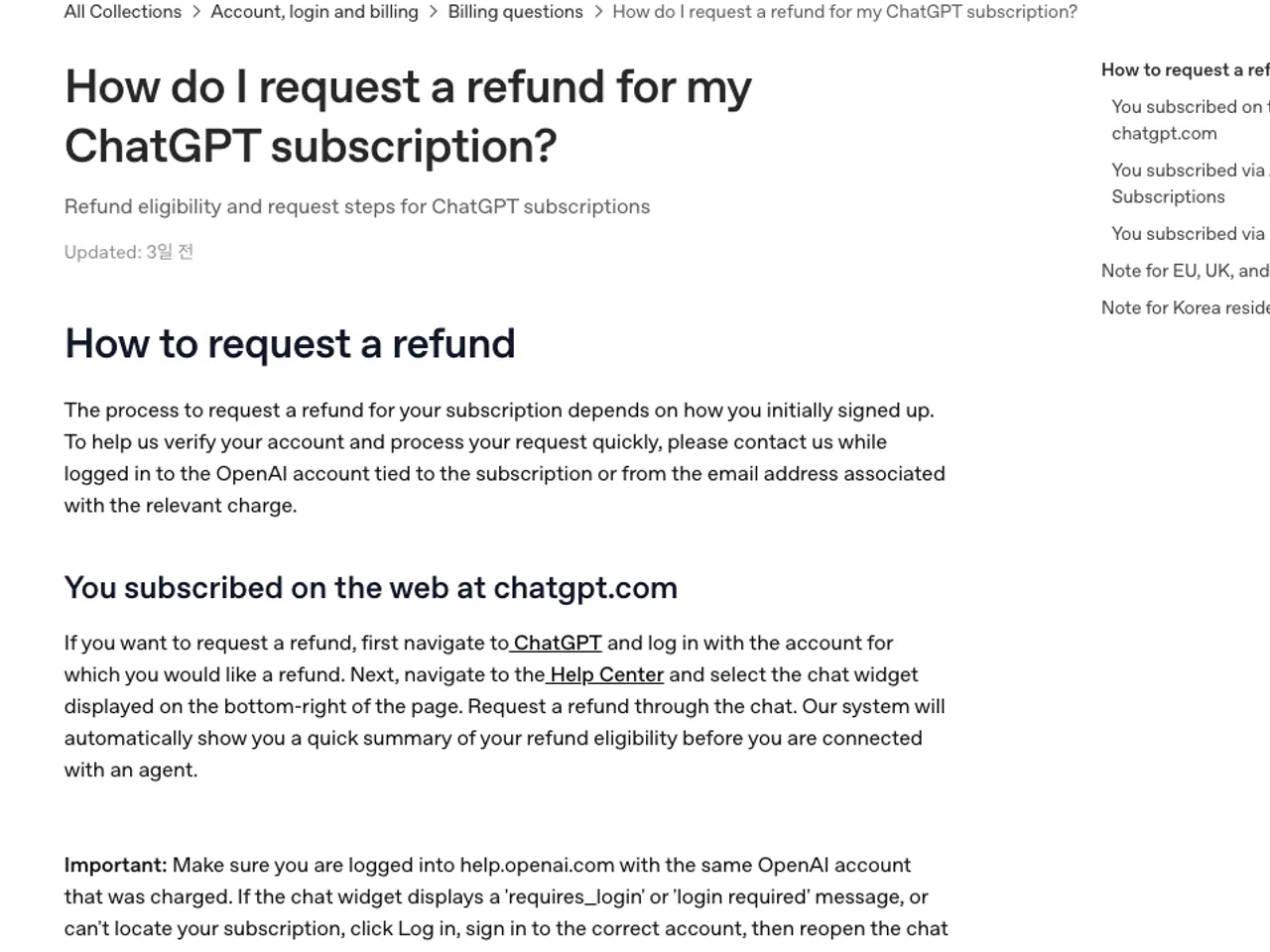
The following steps apply to subscriptions purchased via the web. Users who paid through Google Play must use the same request channel but should expect a longer processing time of 10 business days.
- Log in to ChatGPT using the account associated with the subscription to be refunded.
- Navigate to help.openai.com and verify the same account is logged in via the account icon in the top-right corner.
- Open the chat widget in the bottom-right corner of the page and submit a refund request.
- Review the auto-generated refund eligibility summary to confirm your conditions.
- When connected to a support agent, provide the payment account email and purchase date.
- After processing, check the registered email for the refund receipt; verify the spam folder if the email is not received.
Pre-request checklist: Confirm the logged-in account matches the payment account, verify the payment method (web or app store), check the number of days since purchase, and confirm whether the service was used during that period.
Troubleshooting login errors during refund requests
Errors such as "requires_login" or "login required" in the chat widget, or messages indicating the subscription cannot be found, typically occur when the account logged into help.openai.com differs from the payment account.
To resolve this, log out of the current account, log back in using the payment account email, and reopen the chat widget to resubmit the request. This issue frequently arises when social logins and email logins are mixed. Use the email address listed on the payment receipt to identify the correct account.
Deleting the account cancels active subscriptions and stops future billing, but this is not a refund method. Refunds for already paid amounts must be requested separately.
Confirming refund status and handling delays
A successful refund results in a receipt sent to the registered email and a cancellation status update for the subscription. If the payment method still shows a charge after the stated processing period, check the transaction details with the card issuer, as settlement delays may occur.
For unresolved delays beyond the stated period, contact the support channel again. OpenAI’s official guidance specifies that compensation may apply for delays deemed attributable to their policies, and the same channel handles complaints, damages, and dispute resolution.
If cancellation is the only requirement and no refund is needed, the process is simpler. Cancelling via the subscription settings retains premium features until the end of the paid period, and billing stops from the next cycle. Unlike refund requests, access is not immediately revoked, making this option suitable if the remaining period will be used.
For users unable to access the web widget, an alternative is to contact support using the email address associated with the payment. The support team requires confirmation of the payment account to process the request; include identifying information about the payment account in any inquiry.
Revision history · 2026-09-24
This article was revised against the provider’s official documentation. Korean note
Sources
OpenAI Help Center — How do I request a refund for my ChatGPT subscription? (2026-09-24)
OpenAI Help Center — Canceling your ChatGPT subscription (2026-09-24)
Open provider document