Issue OpenAI API Key and Secure.env File
Issue an OpenAI API key, store it in a .env file, isolate it with .gitignore, and diagnose 401 auth errors in five steps.
 OpenAI
- Category
- Developer tools & APIs
- Official sources
- 9
- Read time
- 5 min
- Last checked
- 2026.09.02
OpenAI Platform Key Issuance and Security Management Standards
An OpenAI API key is directly linked to the developer account's billing credentials. If a hardcoded API key in source code leaks to an external code repository, unauthorized calls can occur and generate unwanted charges. The OpenAI Platform API service supports in-transit data encryption (TLS 1.2 or higher) and at-rest encryption (AES-256) by default, but client-side secret key isolation during application development remains the developer's responsibility.
For personal projects, issue the key from the default dashboard and manage it via a .env file. For organization team environments, generate keys with project-specific permissions from the admin console. Clearly separating development and production credentials minimizes the impact radius when a security incident occurs.
| Management Item | Personal Development Environment | Organization Team Environment |
|---|---|---|
| Issuing Entity | Personal dashboard account | Organization Admin or Owner |
| Key Scope | Account-wide shared | Project- or department-specific dedicated keys |
| Security Policy | .gitignore registration required | .gitignore registration and project-specific spend limits |
| Exposure Response | Revoke and reissue via API dashboard | Revoke project key and review organization audit logs |
Minimal Working Code Example Using .env File
Do not define the API key directly as a string inside application source code; instead, call it through an environment variable management library. Load the .env file located at the project root path in a Node.js or Python environment and reference the OPENAI_API_KEY variable.
The following is a minimal Python example that reads environment variables from a .env file and executes an OpenAI model request.
import os
from dotenv import load_dotenv
from openai import OpenAI

load_dotenv()

client = OpenAI(
    api_key=os.getenv("OPENAI_API_KEY")
)

response = client.chat.completions.create(
    model="gpt-4",
    messages=[{"role": "user", "content": "API security setup complete"}]
)

print(response.choices[0].message.content)
Five Steps to Issue OpenAI API Key and Store Environment Variable
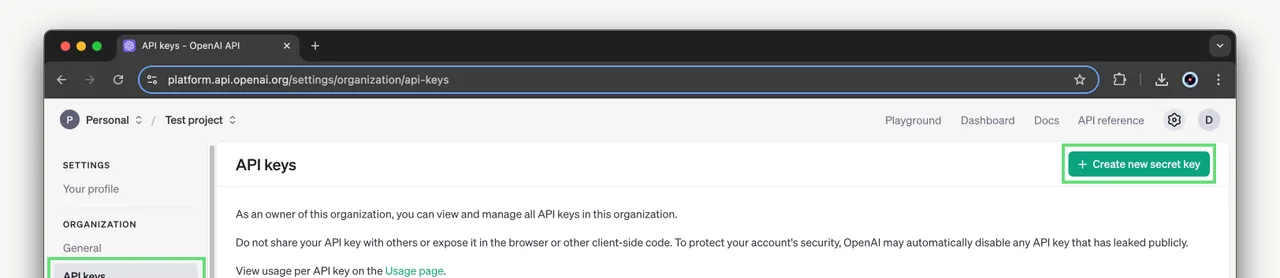
The actual operational sequence from API key issuance through local development environment application and version control system isolation is as follows.
- Access the OpenAI Platform console (platform.openai.com), log in, and select API Keys from the left menu.
- Click Create new secret key, enter an identifying Name, specify account permissions or project scope, and generate the key.
- Copy the
sk-prefixed secret key string displayed in the popup to a secure temporary text store, then click Done to close the window. - Create a file named
.envin the local development project's top-level root directory, enterOPENAI_API_KEY=sk-proj-...with the copied key value, and save. - Open the
.gitignorefile in the project root directory, add.envon its own line, save, then rungit statusto verify that the.envfile does not appear in Untracked files.
Values to Exclude from Git Repository and Code
Certain identifiers and files must never be stored in a source control management system or shared externally. Accidental inclusion in a Git commit creates immediate exposure risk via automated scanning tools.
- Full OpenAI secret API key string beginning with
sk- - All runtime environment configuration files such as
.envand.env.localcontaining API keys and environment variable values - OAuth tokens, private key files, and organization-specific API credentials used for account authentication
- Local logging files containing user personal information or corporate confidential data
- Past commit messages or hardcoded test code inside
.githistory
API Authentication and Configuration Error Diagnosis with Server Environment Alternatives
Diagnose security and configuration issues by error messages and response codes returned during API calls, then apply recovery actions.
When a 401 Unauthorized error occurs, check whether the key string in the .env file has trailing whitespace and correct the string.
If an Invalid API Key response persists, verify in the OpenAI Platform dashboard whether the key is in Revoked state, then reissue a new Secret Key and apply it.
If the key stored in the .env file was committed to the Git repository and exposed, immediately revoke the key in the dashboard, generate a new key, and update the environment variable.
When a 429 Too Many Requests error appears, check the API account balance and monthly spend limit (Usage limit) configuration in the dashboard's Billing menu.
When local file-based environment variable management cannot be applied in CI/CD pipelines or cloud deployment environments, switch to platform-specific Secret Manager systems (AWS Secrets Manager, GitHub Secrets, etc.) to inject environment variables. Moving to a centrally managed system allows secure API key delivery without placing environment variable files directly in the source code repository.
Sources checked
help.openai.com — ChatGPT file uploads FAQ (2026-09-02)
openai.com — Business data privacy, security, and compliance (2026-09-02)
help.openai.com — Managing data, sharing, and privacy in ChatGPT Business (2026-09-02)
help.openai.com — Data Controls FAQ (2026-09-02)
openai.com — OpenAI | Research & Deployment (2026-09-02)
openai.com — GPT-4 | OpenAI (2026-09-02)
openai.com — About - OpenAI (2026-09-02)
openai.com — API Platform | OpenAI (2026-09-02)
en.wikipedia.org — OpenAI - Wikipedia (2026-09-02)
Open provider document