Wix vs Framer Pricing: Free, Personal and Business Plan Limits
Framer Basic is $10 and Pro $30 a month on yearly billing; Wix Light $17, Core $29, Business $39, Elite $159. Payments start at Wix Core.
 Framer
- Category
- Comparison
- Official sources
- 3
- Read time
- 6 min
- Last checked
- 2026.09.24
The two services structure their plans differently
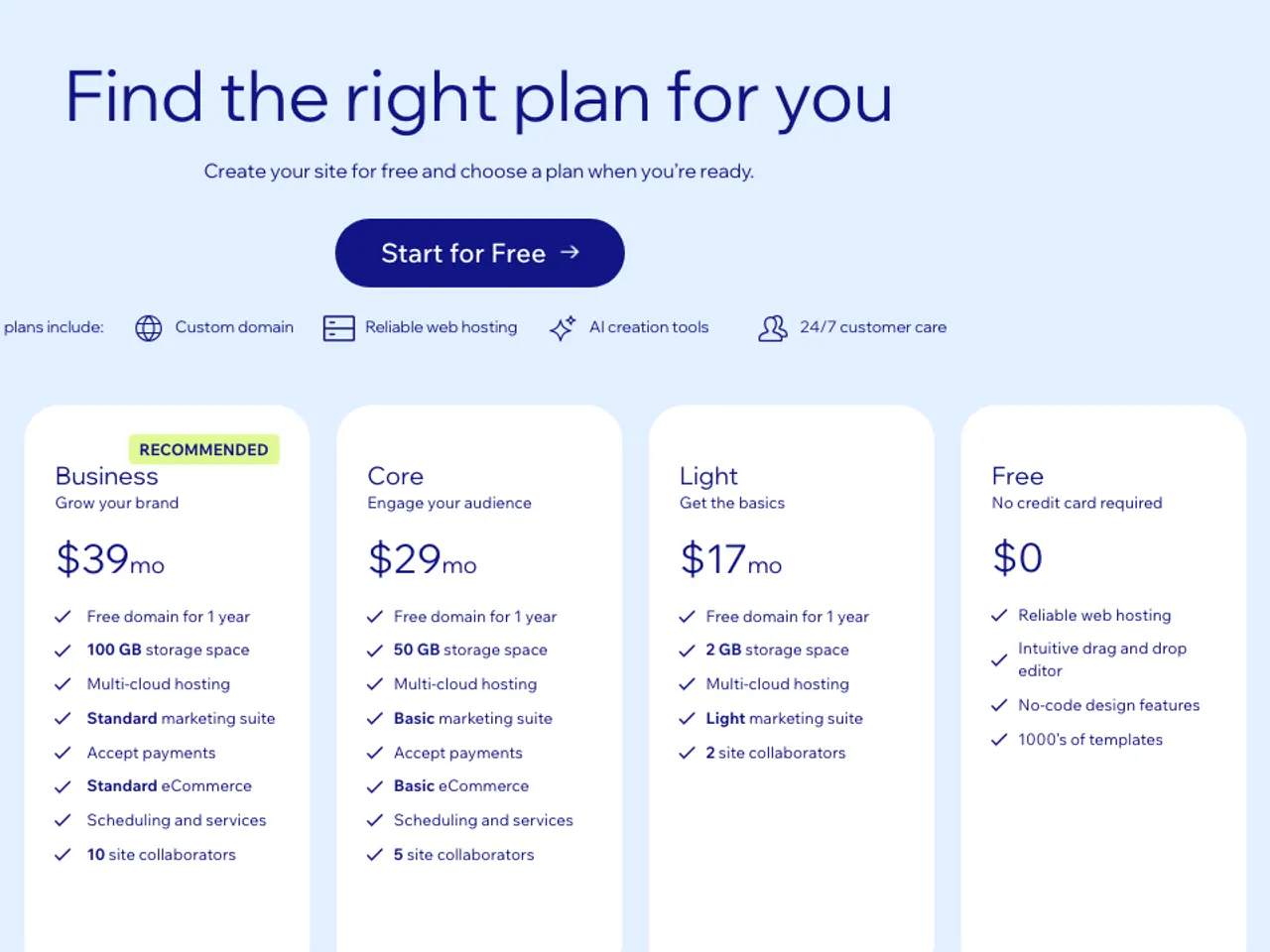
Framer's individual plans are Free, Basic and Pro, with Enterprise (custom contract) above them. The pricing page shows Basic at $10 and Pro at $30 per month on yearly billing; additional editors are $20 per month each and viewers are free.
Wix's site plans are Free and then Light, Core, Business and Business Elite; the US page shows $17, $29, $39 and $159 per month on yearly billing as reference prices and states that prices and currency vary by location. Korean accounts see KRW amounts at checkout, and the displayed prices exclude taxes.
[1][2]
| Item | Framer Free | Framer Basic | Framer Pro | Wix Free | Wix Light | Wix Core | Wix Business | Wix Business Elite |
|---|---|---|---|---|---|---|---|---|
| Monthly price (yearly billing) | $0 | $10 | $30 | $0 | $17 | $29 | $39 | $159 |
| Custom domain | No (Framer domain) | Yes (free domain for a year on yearly billing) | Yes (free domain for a year on yearly billing) | No | Yes (free domain for a year) | Yes | Yes | Yes |
| Bandwidth | 1 GB | 50 GB | 100 GB | Not shown | Not shown | Not shown | Not shown | Not shown |
| Storage | Not shown | Not shown | Not shown | Not shown | 2 GB | 50 GB | 100 GB | Unlimited |
| AI credits | 500 to try | From 1,000 per month | From 3,000 per month | Wix AI tools | Wix AI tools | Wix AI tools | Wix AI tools | Wix AI tools |
| CMS | Not shown | 2 collections | 10 collections | Not shown | Not shown | Not shown | Not shown | Not shown |
| Accept online payments | None | None | None | No | No | Yes | Yes | Yes |
Source: Framer pricing page; Wix plans page (US, USD reference). "Not shown" means the pricing page has no such item. [1][2]
Framer's Basic and Pro credits can be bought in higher tiers (up to 15,000 per month on Basic and 100,000 on Pro) and the first month is doubled. Wix lists AI tools included in the plan rather than credits, so the AI items of the two services cannot be compared in one unit. [1][2]
A store or payments means Wix Core or higher
If you need to accept online payments, choose Wix Core or higher. Wix's help center states that the Light plan cannot accept payments through the site, and payment acceptance starts at Core. Framer's pricing page has no payments or store item, so a site that needs payments on Framer must connect an outside payment service, with its own cost and upkeep.
[2][3]
For a blog, portfolio or company page that only receives visitors, Framer Basic ($10 per month) is cheaper than Wix Light ($17). Framer Basic's bandwidth is 50 GB per month, though, so an image-heavy site with growing traffic will need Pro (100 GB), while Wix does not list bandwidth in its plan table.
If you publish a lot through a CMS, check Framer Basic's limit of two collections first. [1]
Starting on a free plan
Framer Free only uses a Framer domain, has 1 GB of monthly bandwidth and includes 500 AI credits to try; Framer describes the Free plan as suited to non-commercial use. Wix Free cannot connect a custom domain and shows Wix branding on the site, which a premium plan removes.
On both services a site built on the free plan does not need to be rebuilt when you upgrade. [1][2]
If you only want a custom domain for free, neither service allows it, so at least Framer Basic or Wix Light is required. If a few static pages are enough and no editor is needed, free static hosting such as GitHub Pages or Cloudflare Pages is the alternative.
Confirming that a paid plan took effect
- On Framer, check the plan name and next billing date under Billing in the workspace settings; on Wix, open Premium Subscriptions in the account and confirm the subscription is assigned to the site.
- After connecting a custom domain, confirm the padlock (SSL) shows in the address bar.
- On Framer, create one CMS collection to confirm it saves and check that bandwidth usage appears in the dashboard.
- On Wix Core or higher, check the payment provider's connection status on the Accept Payments screen.
- Compare the first invoice with the yearly-billing amount on the pricing page (before tax).
If payment went through but features stay locked, on Wix the subscription may not be assigned to the site, so check the assignment under Premium Subscriptions; on Framer, check whether the plan name changed under Billing. If it still does not match, contact each service's support with the receipt.
Refund and cancellation terms are not summarized on either pricing page, so read the terms before paying.
When this comparison does not apply
Agencies running dozens of sites, and organizations that need SSO or contract terms, fall under both services' Enterprise inquiries and cannot be compared on public prices. A site where developers work in code should be compared on Framer's component and plugin ecosystem versus Wix's Velo environment, not on this price table alone.
Both companies change prices by region and over time, so re-check the pricing page right before paying. [1][2]
Revision history · 2026-09-24
This article was revised against the provider’s official documentation. Korean note
Sources
framer.com — Framer Pricing (2026-09-24)
wix.com — Wix Pricing Information (2026-09-24)
support.wix.com — Choosing a Premium Plan (2026-09-24)
Open provider document